Copilot Snapshot
Copilot Snapshot
2023–PRESENT • AI-POWERED DOCUMENT COMPREHENSION
2023–PRESENT • AI DOCUMENT COMPREHENSION
While features like Draft with Copilot and Copilot Chat rely on user initiation, we identified an important product direction in which Copilot proactively anticipates user needs and surfaces context automatically. In 2023, I led the design of this initiative in Microsoft Word, launching Proactive Summary and later evolving it into Copilot Snapshot, Microsoft 365’s first proactive AI surface for document comprehension. Copilot Snapshot helps users orient themselves in dense documents immediately upon opening a file.
While features like Draft with Copilot and Copilot Chat rely on user initiation, we identified an important product direction in which Copilot proactively anticipates user needs and surfaces context automatically. In 2023, I led the design of this initiative in Microsoft Word, launching Proactive Summary and later evolving it into Copilot Snapshot, Microsoft 365’s first proactive AI surface for document comprehension. Copilot Snapshot helps users orient themselves in dense documents immediately upon opening a file.

OCTOBER 2023–MARCH 2024
User research showed that writers often manually summarize documents to help readers catch up. To automate this, I designed Proactive Summary to provide a summary immediately upon opening a file—reducing the need for users to scroll, search, or ask Copilot explicitly.
+124%
COPILOT ACTIVATION
75%
THUMBS‑UP RATE
OCTOBER 2023–MARCH 2024
User research showed that writers often manually summarize documents to help readers catch up. To automate this, I designed Proactive Summary to provide a summary immediately upon opening a file—reducing the need for users to scroll, search, or ask Copilot explicitly.
+124%
COPILOT ACTIVATION
75%
THUMBS‑UP RATE
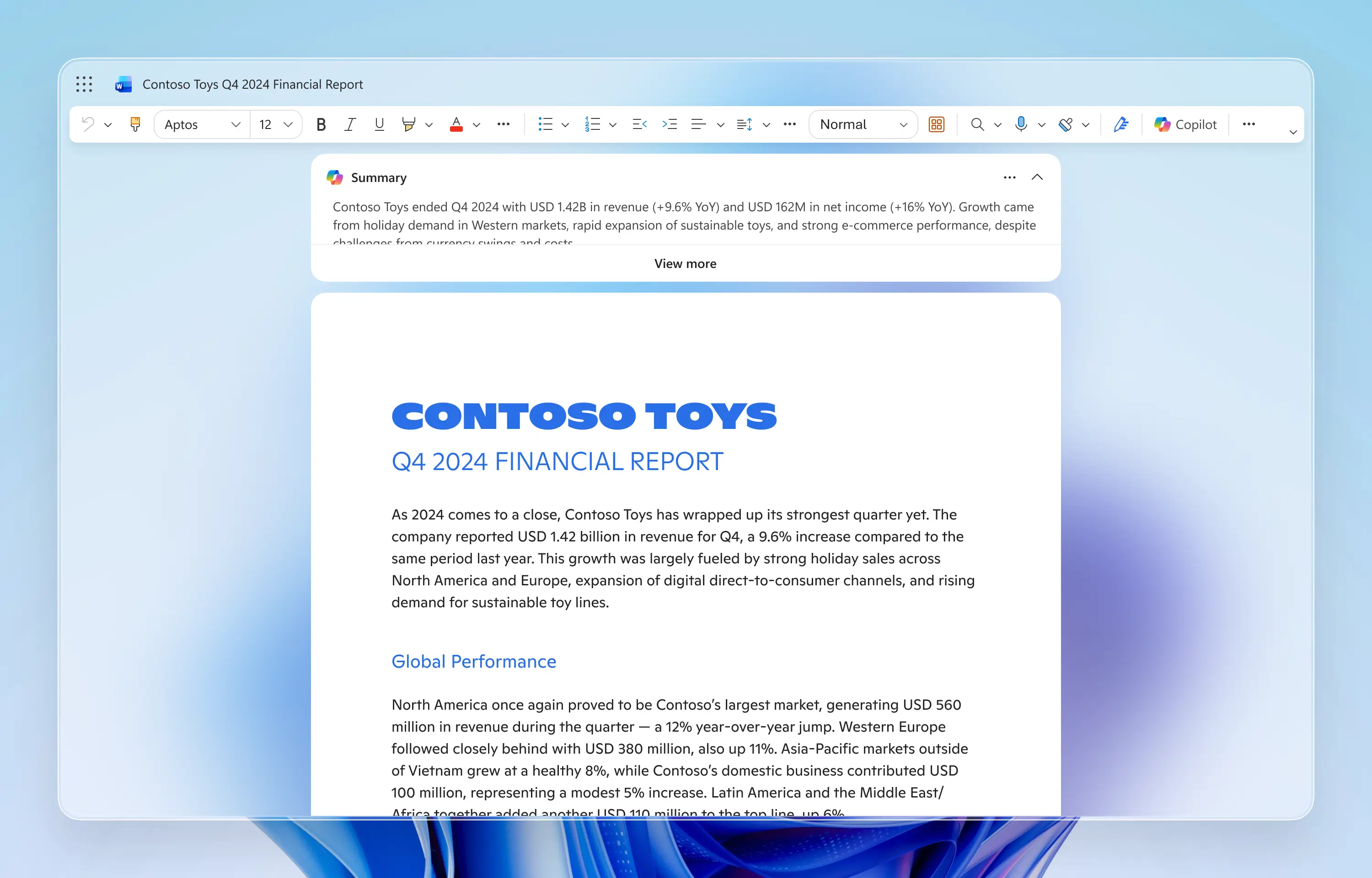
A semi-expanded UI appears at the top of the canvas on first open, providing a document summary without obscuring the document content.
A semi-expanded UI appears at the top of the canvas on first open, providing a document summary without obscuring the document content.
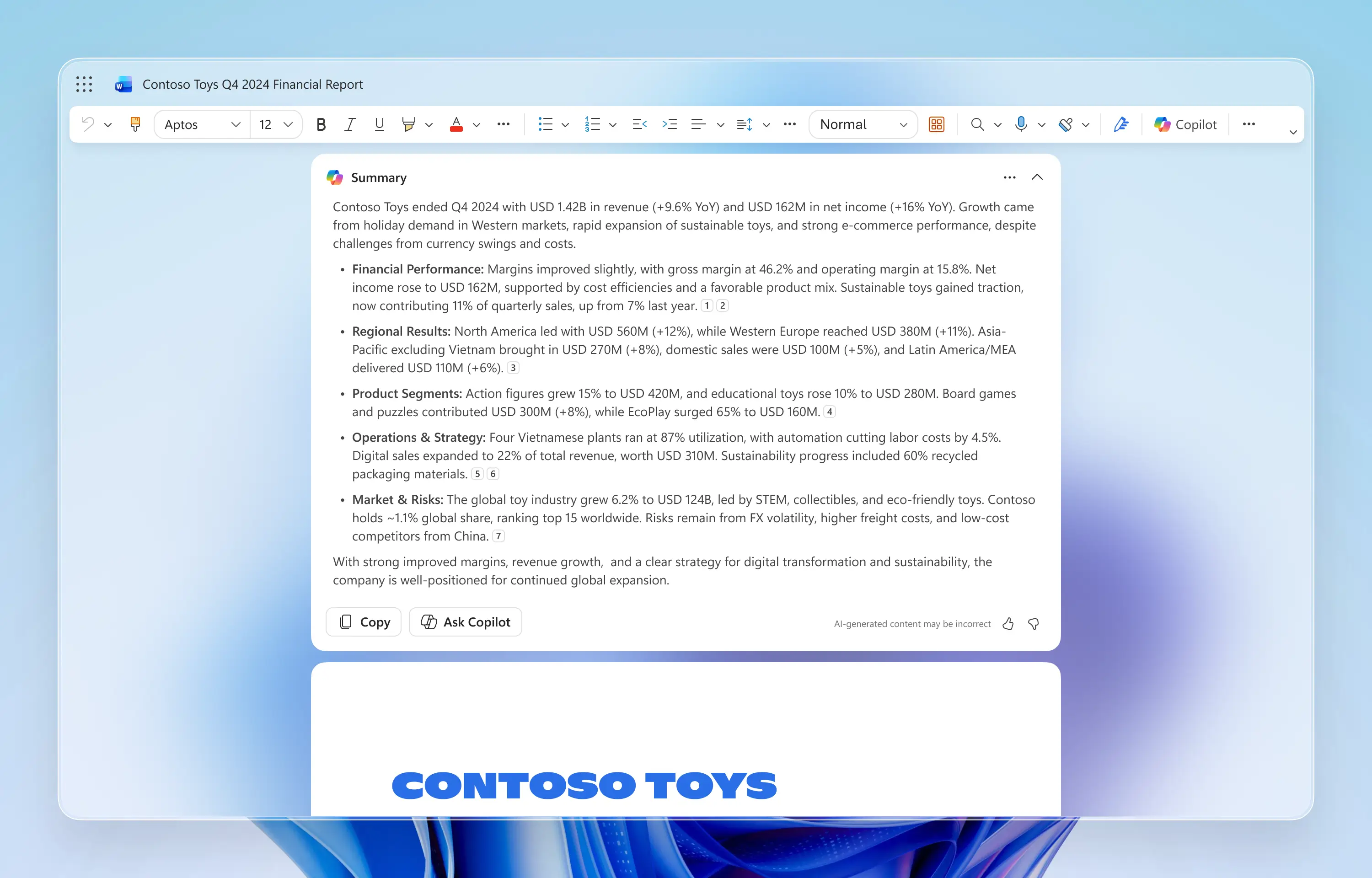
When expanded, users can copy the summary directly or interact with Copilot Chat via the Ask Copilot button, seamlessly bridging proactive understanding with conversational follow-up.
When expanded, users can copy the summary directly or interact with Copilot Chat via the Ask Copilot button, seamlessly bridging proactive understanding with conversational follow-up.
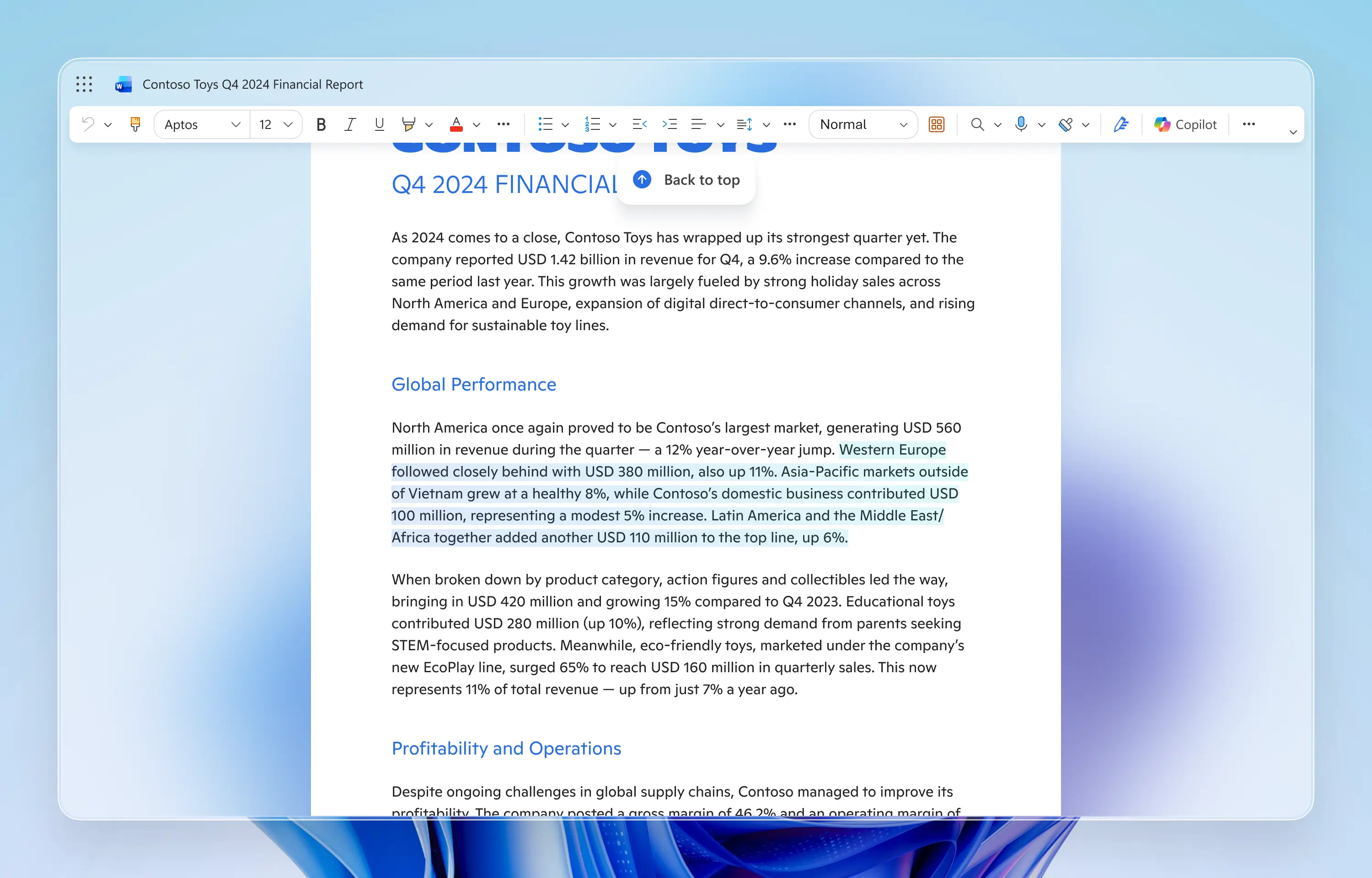
Embedded citations let users jump directly to referenced content. A persistent “Back to top” affordance ensures they can always return to the summary without excessive scrolling.
Embedded citations let users jump directly to referenced content. A persistent “Back to top” affordance ensures they can always return to the summary without excessive scrolling.
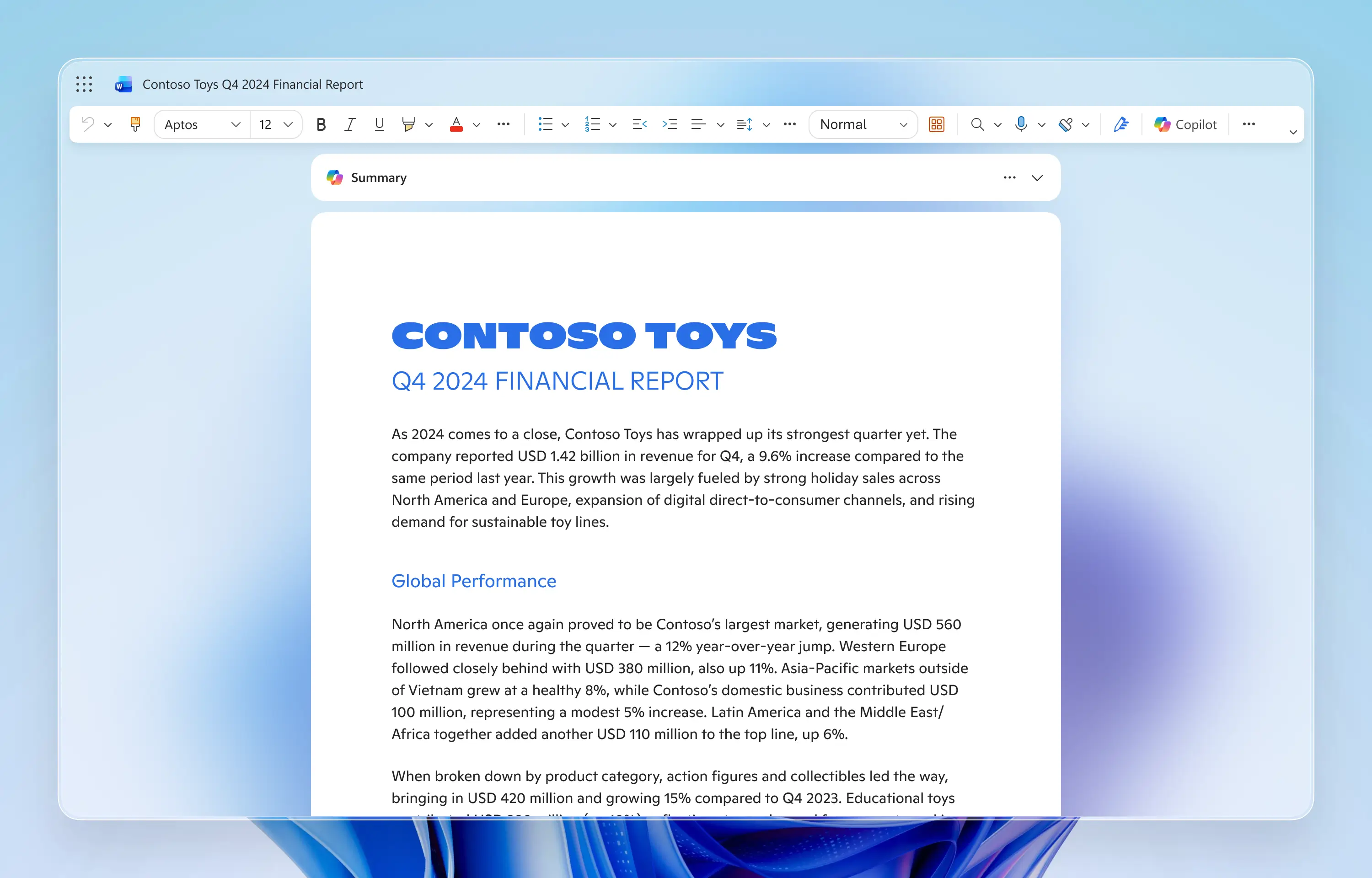
When collapsed, Proactive Summary remains pinned in a compact size, maintaining visibility while minimizing visual intrusion.
When collapsed, Proactive Summary remains pinned in a compact size, maintaining visibility while minimizing visual intrusion.
MARCH 2024–SEPTEMBER 2025
The success of Proactive Summary validated the Proactive AI strategy, influencing teams across PowerPoint, Azure, and Power BI to explore similar experiences. As adoption grew, user feedback made it clear that a single summary was not sufficient. Users wanted different types of understanding, at different levels of depth, depending on their role and task.
In response, I led the evolution of Proactive Summary into Copilot Snapshot, introducing a multi-tabbed interface that expanded the scope beyond summarization to include deep insights and activity tracking.
+22%
COPILOT ACTIVATION
#1
WAU IN WORD COPILOT
39%
MONTHLY RETENTION
+26%
THUMBS‑UP RATE
MARCH 2024–SEPTEMBER 2025
The success of Proactive Summary validated the Proactive AI strategy, influencing teams across PowerPoint, Azure, and Power BI to explore similar experiences. As adoption grew, user feedback made it clear that a single summary was not sufficient. Users wanted different types of understanding, at different levels of depth, depending on their role and task.
In response, I led the evolution of Proactive Summary into Copilot Snapshot, introducing a multi-tabbed interface that expanded the scope beyond summarization to include deep insights and activity tracking.
+22%
COPILOT ACTIVATION
#1
WAU IN WORD COPILOT
39%
MONTHLY RETENTION
+26%
THUMBS‑UP RATE
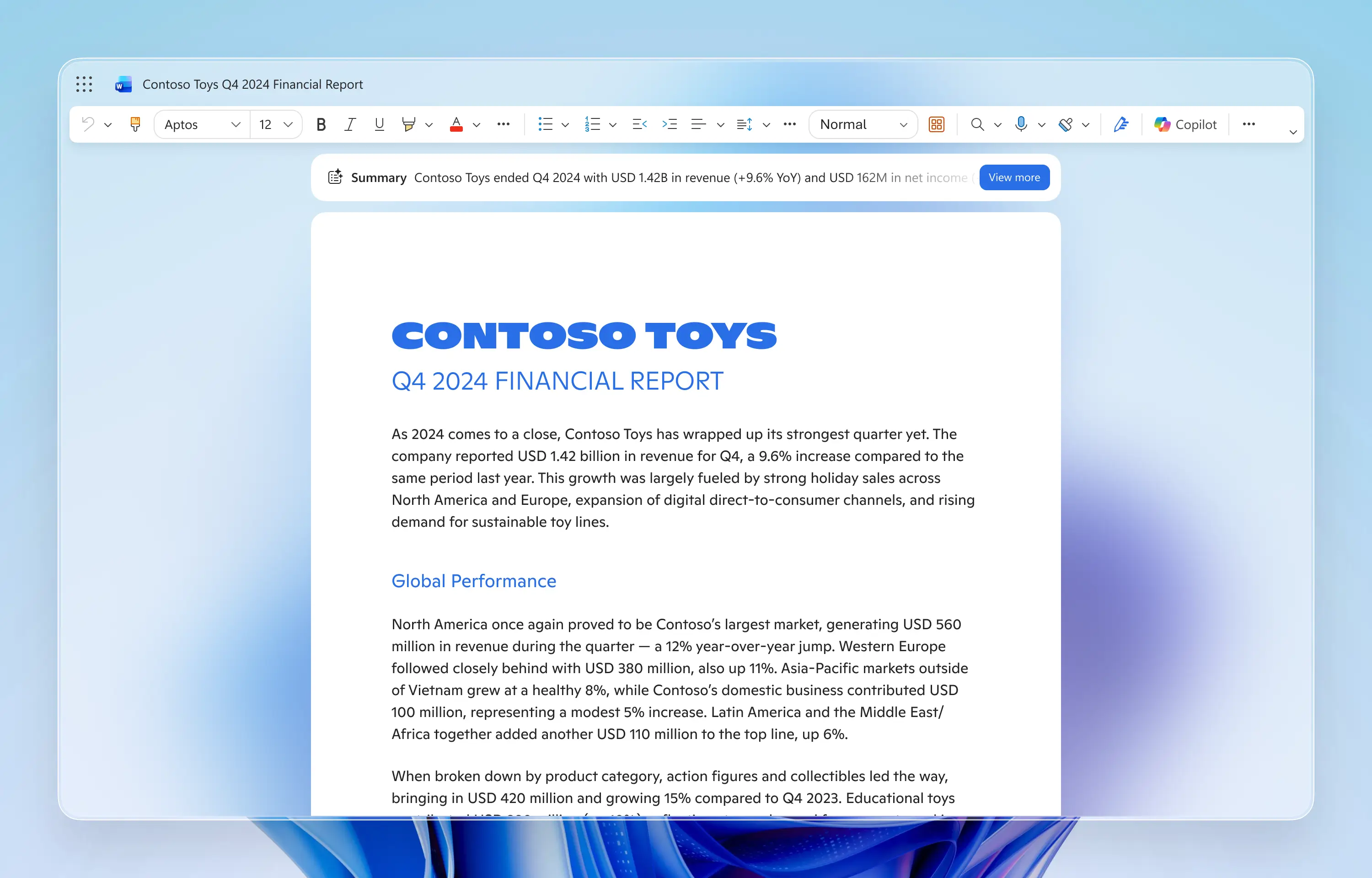
Adapting to user familiarity, I reduced the size of the collapsed preview and shifted the UI from an attention-grabbing intervention to a lightweight, everyday utility.
Adapting to user familiarity, I reduced the size of the collapsed preview and shifted the UI from an attention-grabbing intervention to a lightweight, everyday utility.
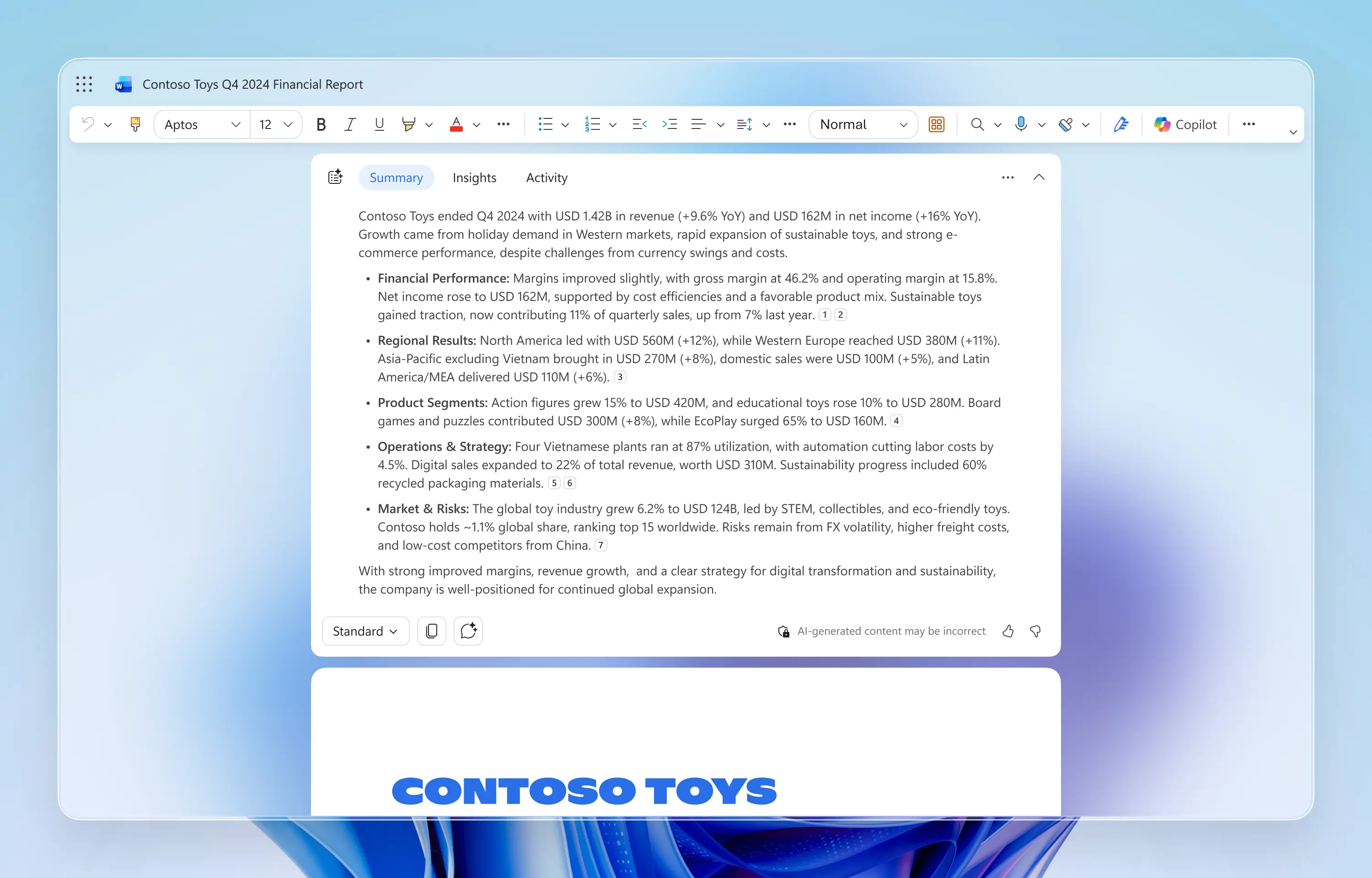
I introduced adjustable summary depths (Brief, Standard, Detailed), allowing users to seamlessly switch from skimming to deep study depending on their intent.
I introduced adjustable summary depths (Brief, Standard, Detailed), allowing users to seamlessly switch from skimming to deep study depending on their intent.
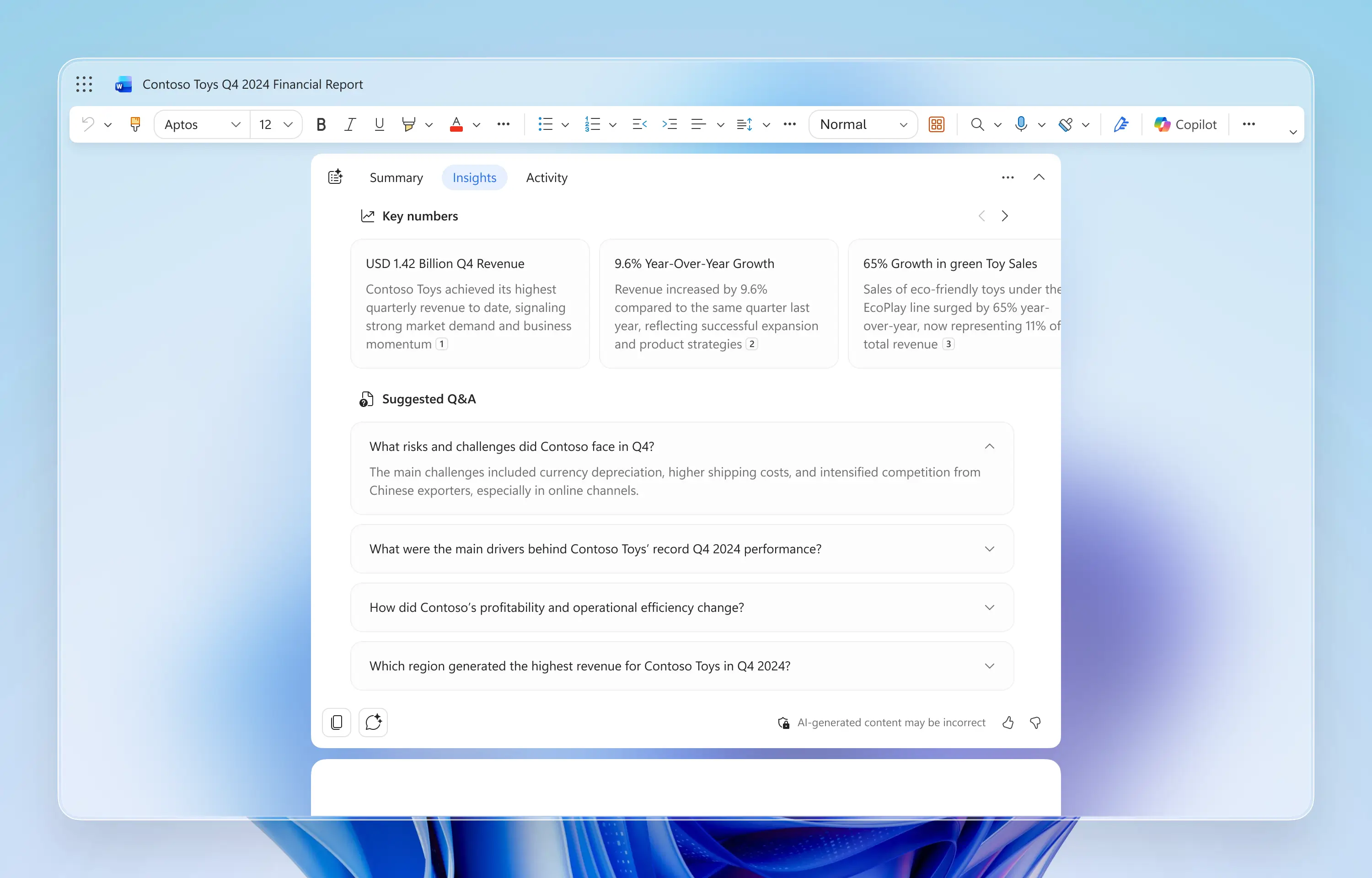
To support business workflows, I designed an Insights tab that provides key figures and suggested Q&A.
To support business workflows, I designed an Insights tab that provides key figures and suggested Q&A.
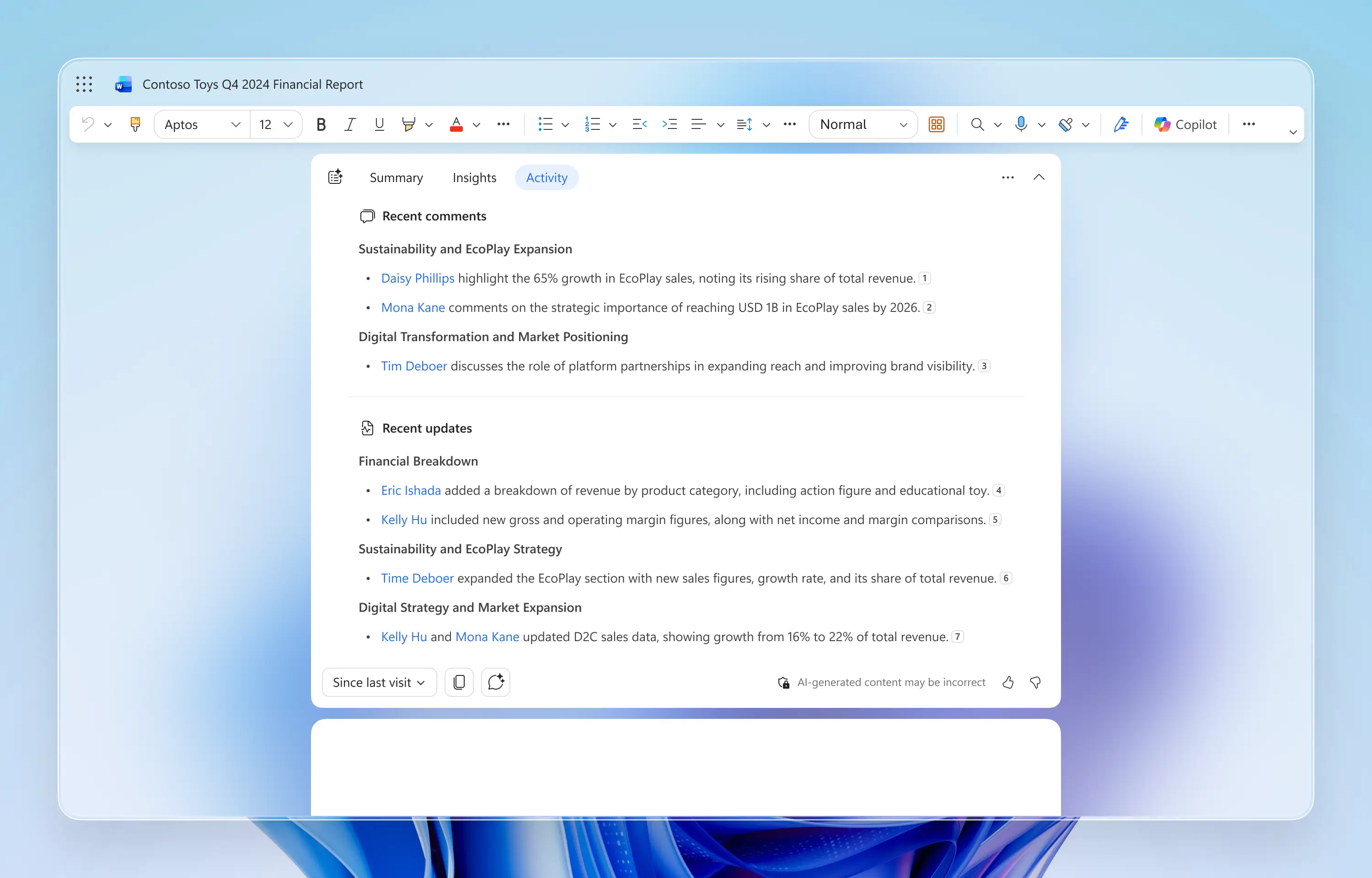
The Activity tab summarizes recent edits and comments, transforming the Copilot Snapshot from static content into a dynamic tool for asynchronous collaboration.
The Activity tab summarizes recent edits and comments, transforming the Copilot Snapshot from static content into a dynamic tool for asynchronous collaboration.
SEPTEMBER 2025–PRESENT
As Microsoft moved toward a unified Copilot experience, I refined Snapshot to align with the new system design principles while preserving the interaction patterns that users had already adopted.
SEPTEMBER 2025–PRESENT
As Microsoft moved toward a unified Copilot experience, I refined Snapshot to align with the new system design principles while preserving the interaction patterns that users had already adopted.
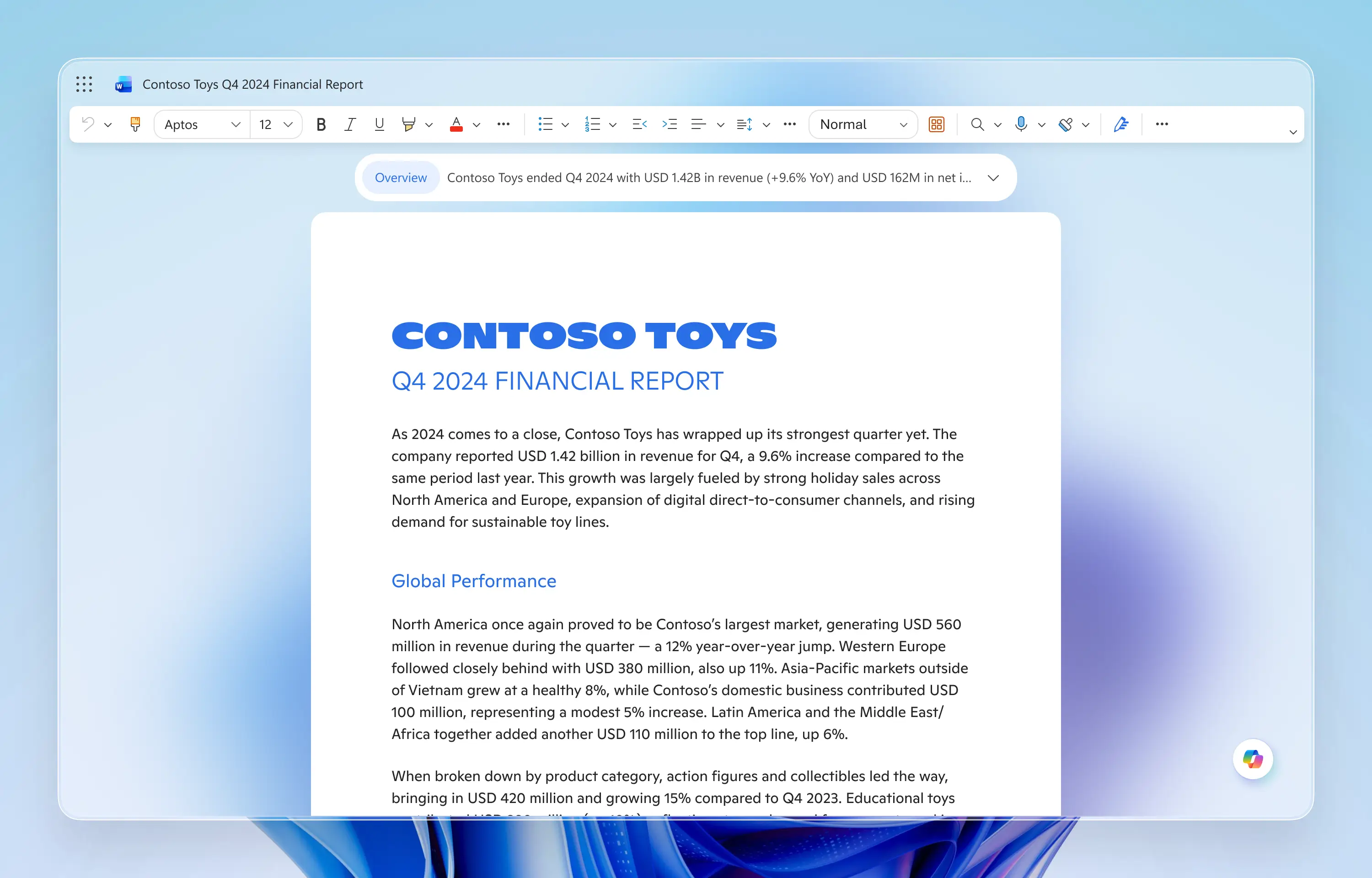
As Snapshot became a routine part of workflows, I progressively reduced its visual weight and aligned it with broader Copilot design guidelines.
As Snapshot became a routine part of workflows, I progressively reduced its visual weight and aligned it with broader Copilot design guidelines.
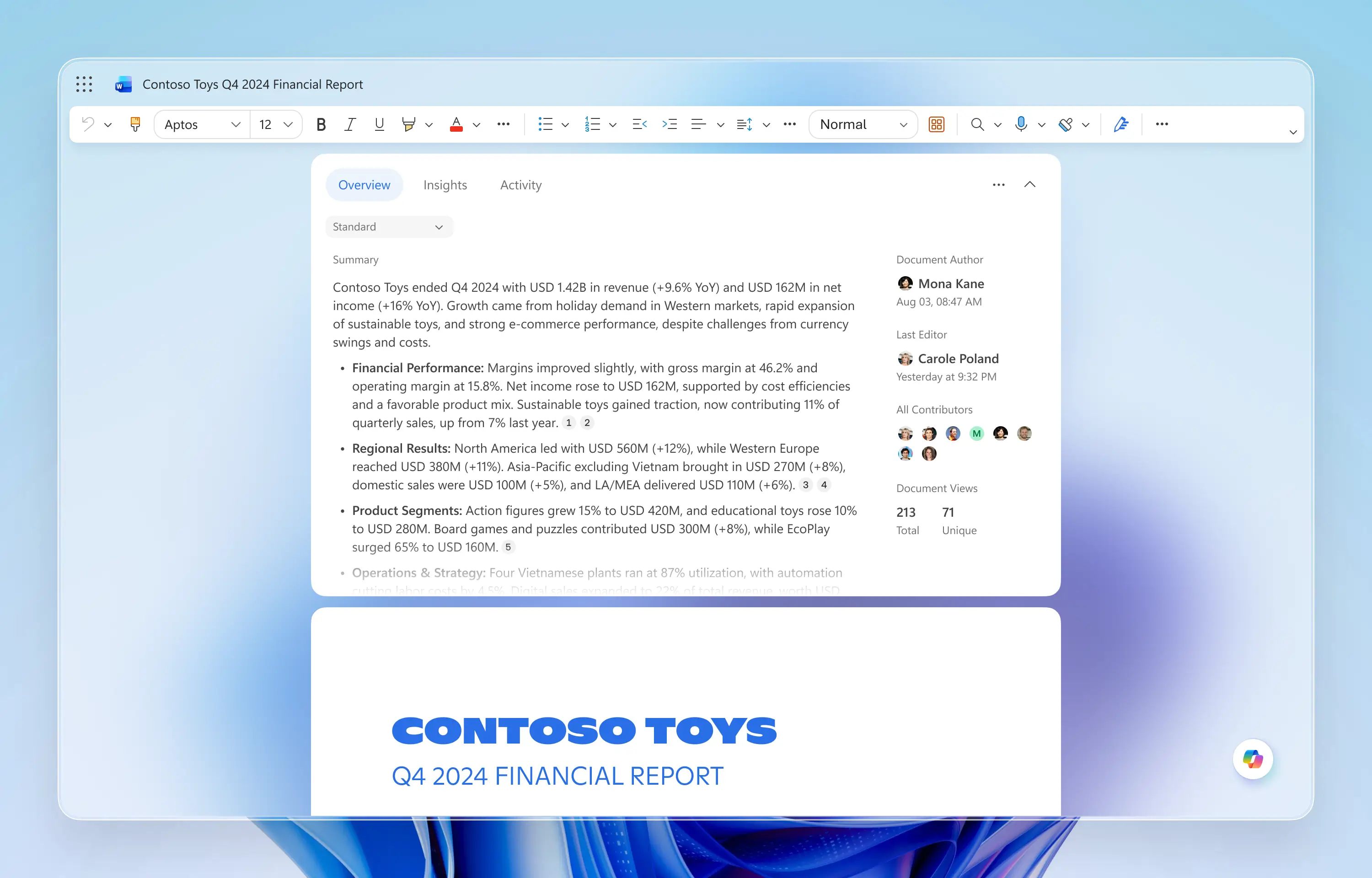
I added Document Stats to the right side, evolving the Summary tab into a broader Overview tab for situational awareness.
I added Document Stats to the right side, evolving the Summary tab into a broader Overview tab for situational awareness.
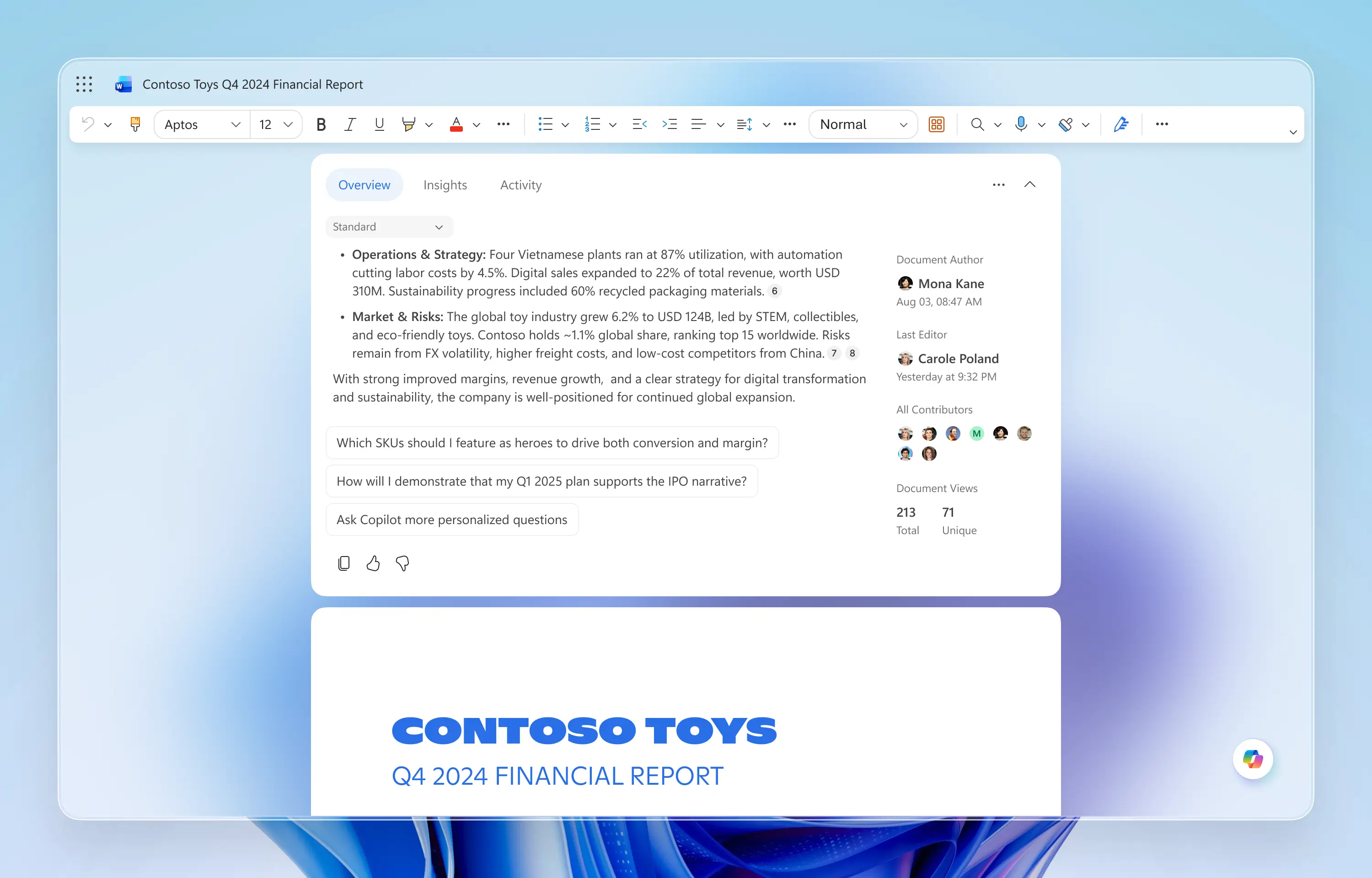
To encourage deeper engagement, I introduced personalized follow-up questions after the summary. These prompts naturally sparked curiosity and increased Copilot Chat activation.
To encourage deeper engagement, I introduced personalized follow-up questions after the summary. These prompts naturally sparked curiosity and increased Copilot Chat activation.
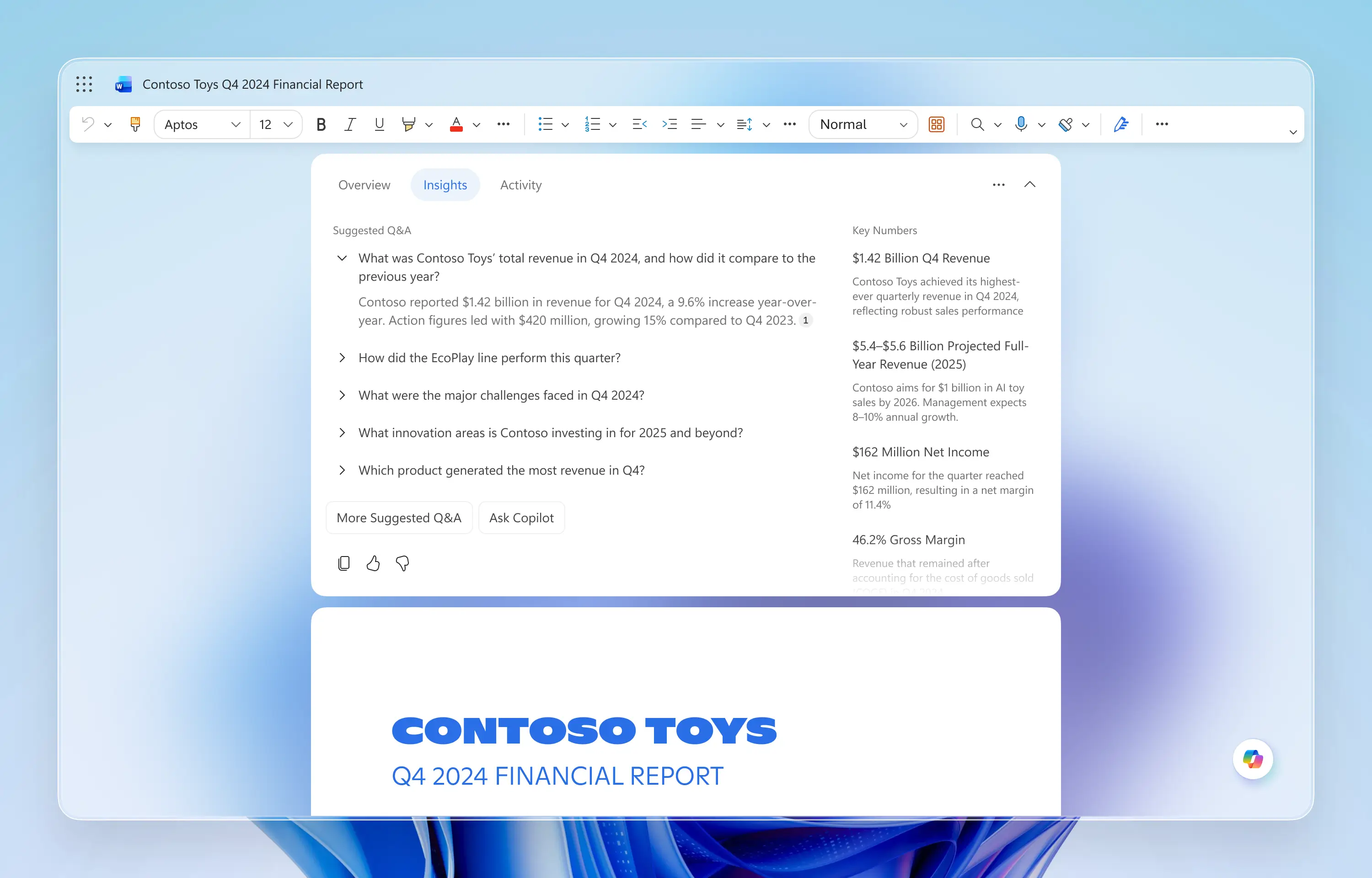
Key Numbers and Suggested Q&A were reorganized into a horizontal layout, improving scanability and scalability across different document lengths.
Key Numbers and Suggested Q&A were reorganized into a horizontal layout, improving scanability and scalability across different document lengths.
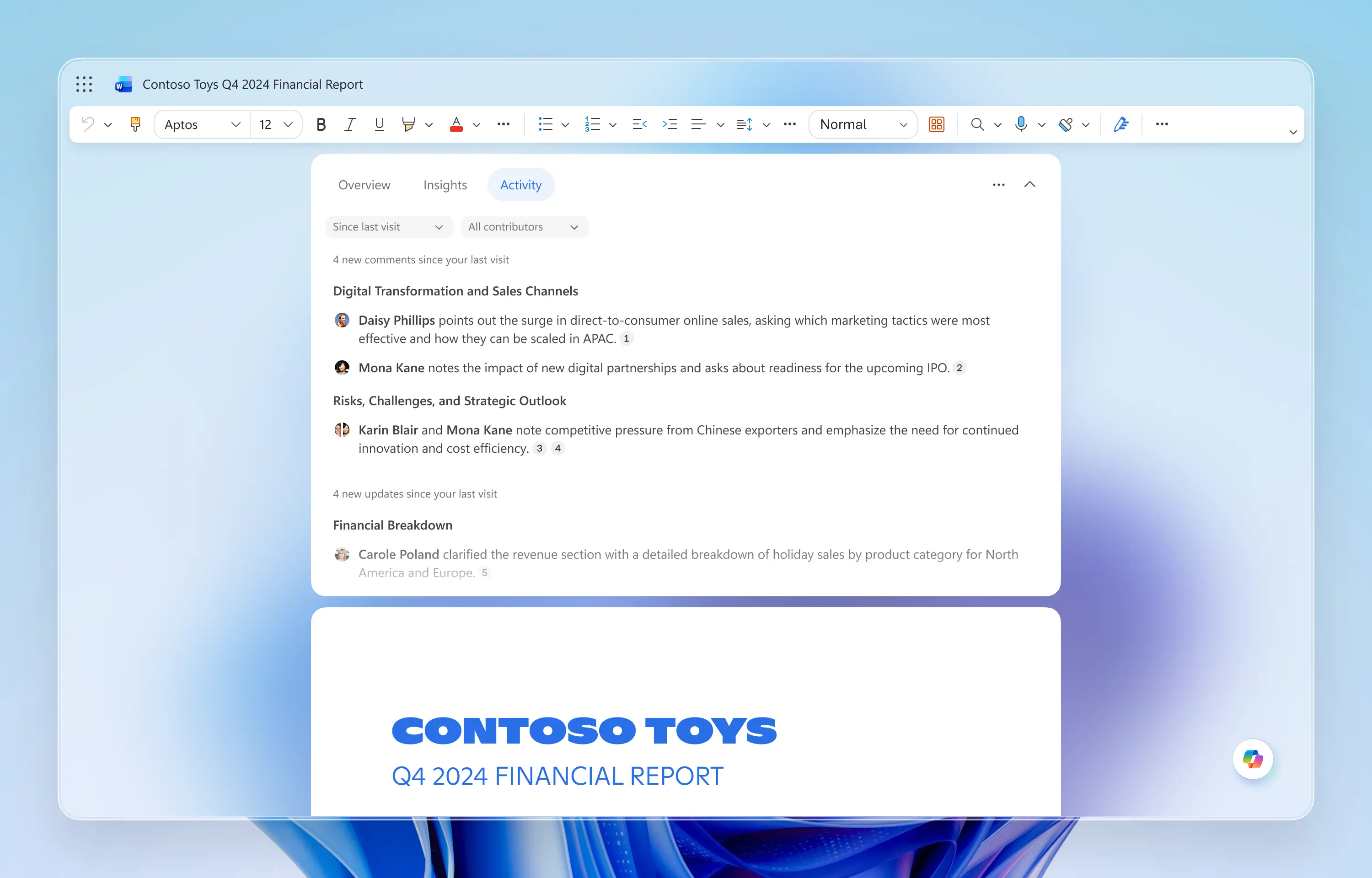
Avatars were added to provide quick visual context about who left each comment.
Avatars were added to provide quick visual context about who left each comment.
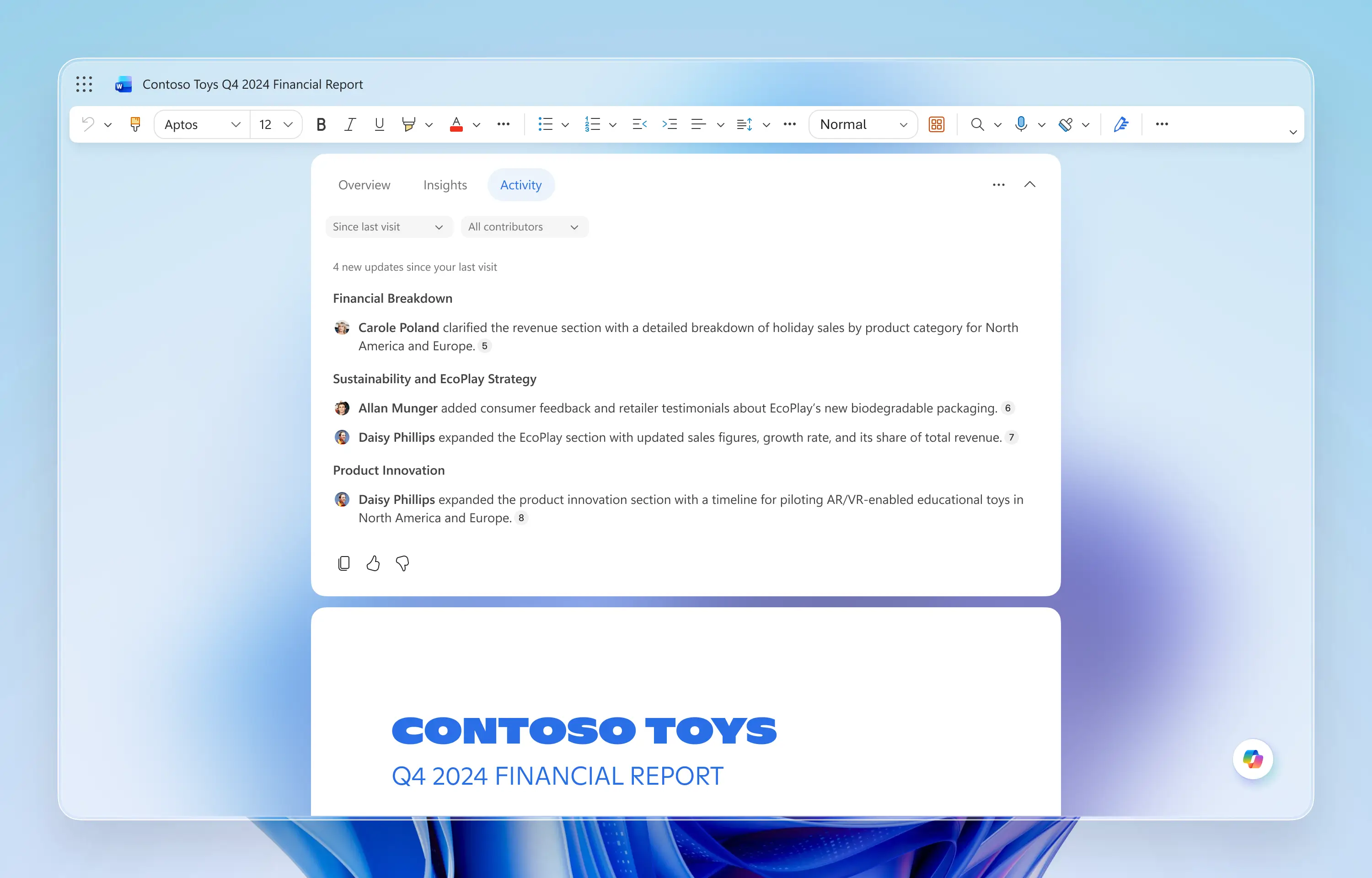
Update summaries were also enhanced with avatars to clearly show contributors.
Update summaries were also enhanced with avatars to clearly show contributors.
Integrating a new AI surface into Microsoft Word’s long-established interface required a careful balance between innovation and familiarity. While some users initially resisted the change, product metrics showed that Copilot Snapshot consistently drove higher activation and retention within Word than other Copilot features—validating the core premise of proactive assistance despite early discomfort.
Beyond the feature itself, this work influenced how we build AI products at scale. Copilot Snapshot became a model for experimentation, and I co-led the A/B testing strategy by defining variants, selecting metrics, and analyzing results to guide iteration.
Ultimately, Copilot Snapshot redefined the 'document opening ritual.' It proved that AI adds value not just by generating content, but by synthesizing context before work begins—demonstrating that anticipatory intelligence can enhance focus rather than disrupt it.
Integrating a new AI surface into Microsoft Word’s long-established interface required a careful balance between innovation and familiarity. While some users initially resisted the change, product metrics showed that Copilot Snapshot consistently drove higher activation and retention within Word than other Copilot features—validating the core premise of proactive assistance despite early discomfort.
Beyond the feature itself, this work influenced how we build AI products at scale. Copilot Snapshot became a model for experimentation, and I co-led the A/B testing strategy by defining variants, selecting metrics, and analyzing results to guide iteration.
Ultimately, Copilot Snapshot redefined the 'document opening ritual.' It proved that AI adds value not just by generating content, but by synthesizing context before work begins—demonstrating that anticipatory intelligence can enhance focus rather than disrupt it.